Categories
Tools

Multi-Site EHS Operating Toolkit

Multi-Site EHS Operating Toolkit

Stop Reinventing Your Safety Program at Every Site. Install a Functioning Multi-Site Operating System.

You’re managing multiple sites with one set of eyes. Monday morning hits and you’re deciding where to drive based on gut feel instead of data. Your corrective actions live in email threads. Your site supervisors mean well but submit evidence inconsistently or not at all. You know what needs to happen, but you don’t have the documents to make the system run without you physically standing there.

This Multi-Site EHS Operating System changes that. Five ready-to-use documents that turn the six systems referred in the below article into something you can install Monday morning.

Read the full article first → How to Manage Safety Across Multiple Sites When You’re a One-Person Department

Download the Free Toolkit

What's inside

✓  Weekly Triage Scorecard – Auto-calculating RAG scorecard. Input five leading indicators per site, get a ranked visit priority and weekly roadmap.

✓  Site Profile One-Pager – Leadership contacts, key hazards, escalation triggers, and RAG status history. 

✓  EHS Charter Template – EHS scope, site leader obligations, corrective action timeframes, and the full escalation ladder.

✓  Supervisor Delegation Checklist –  Daily/Weekly/Monthly evidence submission schedule with specific deliverables per task and immediate alert triggers.

✓  30-Day Safety Champion Onboarding Plan – Week-by-week ramp-up with task tables and deliverable checklists.

Why It’s Worth Your Time

 ➤  Solo EHS Managers covering 3–10 sites  The complete operating system – triage, delegate, monitor, repeat.

➤  Safety Directors scaling a growing operation Standardize multi-site systems before adding headcount.

➤  Construction Safety Managers on multi-project GCs Prioritize site visits by risk, not by which PM calls loudest.

➤  Operations Managers with safety as a secondary responsibility Install a system that runs without becoming your full-time job.

How to use this Multi-Site EHS System

Step 1: Read the Article First

This toolkit is the implementation companion to The Solo Operator’s Guide to Multi-Site EHS Management. The article explains the six systems. The toolkit gives you the documents to run them. Start there.

Step 2: Set Up the Monday Triage (Week 1)

Open the Weekly Triage Scorecard (Excel). List your sites, score each on five leading indicators, and let the auto-calculating RAG logic tell you where to go this week. Fill this out every Monday morning – it takes 15 minutes.

Step 3: Install the Authority and Delegation Framework (Week 1–2)

Get the EHS Charter signed by executive leadership. Distribute the Supervisor Delegation Checklist to every site lead. Complete a Site Profile for each location. These three documents formalize who owns what, what evidence they submit, and what happens when they don’t.

Step 4: Onboard Your First Safety Champion (Week 2–5)

Follow the 30-Day Safety Champion Onboarding Plan exactly. Week 1: orientation and scope. Week 2: shadowed inspections. Week 3: escalation drills. Week 4: independent operation. The plan includes the 10-point inspection checklist and the pre-written escalation script your champion will use daily.

FAQs

Do I need to read the article first?

Strongly recommended. The article explains the six systems this toolkit implements triage, authority charter, Core Plus standards, delegation architecture, site champion network, and centralized data. The toolkit gives you the documents. The article tells you why and how to use them. Read it here →

The toolkit supports OSHA compliance but is not a substitute for legal advice. All regulatory references (29 CFR 1926.20, 1904.30, 1904.39, CPL 2-0.124, etc.) are accurate and link to the systems described in the article. The documents help you build the kind of “reasonable care” documentation that OSHA evaluates during inspections and multi-employer citation proceedings.

The triage scorecard takes 15 minutes to set up and 15 minutes to fill out each Monday. The charter, delegation checklist, and site profiles can be deployed in the first week. The champion onboarding plan runs 30 days. Most solo safety managers have a functioning operating system within 4–5 weeks of download.

Absolutely. All documents are provided in editable formats (Excel and Word). Modify field names, add your company logo, adjust corrective action timeframes, or add site-specific requirements as needed.

The triage scorecard supports up to 10 sites. For larger portfolios, duplicate the scorecard tab or create regional versions. The delegation and champion systems scale to any number of sites, you’re limited by how many champions you can onboard, not by the documents.

Your multi-site training compliance starts with one dashboard.

eTraining business accounts give solo safety managers a centralized dashboard to track training compliance across all locations from one screen. Self-paced courses run without you on-site. Spanish-language options ensure your entire crew is actually protected. Certificates provide the documentation trail your supervisors upload as part of the delegation checklist.

Real Results from Real Teams

Get Started with eTraining

We’re here to make compliance simpler, not more costly. Whether you’re training ten people or a thousand, eTraining gives you the tools to manage safety training with confidence.

No Minimums. No Contracts. Set it up in minutes and start assigning courses right away.
Categories
Tools

Near-Miss Debrief Facilitator Tool

Near-Miss Debrief Facilitator

Your crew just had a close call. What happens next determines whether it happens again. Enter what happened and get a complete, ready-to-run debrief package in under 3 minutes.

According to an Intelex study, 85% of organizations experience repeat injuries within a 12-month period. A report gets filed. The conversation that could actually change behavior never happens. 

Every near-miss is a signal. This tool generates everything you need to run a structured, no-blame conversation with your crew, so the close call becomes a lesson, not a preview.

Check out this blog that talks about 9 Moves to Turn Near-Miss Reports Into Real Risk Reduction →

Free EHS Leader Resource

Turn Near-Misses Into Culture-Changing Learning Moments

This tool runs entirely in your browser. No data entered into this tool is collected, stored, or shared by eTraining Inc. Your details are kept private and visible only to you.

What you'll receive

Team Debrief Guide
A ready-to-run facilitation guide with no-blame questions, prep tips, and a closing commitment structure
Safety Learning Card
A one-page summary to share site-wide, print, post, or email to your whole team
Corrective Action Tracker
Pre-populated with recommended actions based on your event's contributing conditions
Grounded in Human Factors analysis · Aligned with ICAM framework and Swiss Cheese investigation principles

A free resource from eTraining Inc. No account required.

Step 1 of 3
Event Context
Tell us about the type of work and the potential impact of this near-miss.

Select the type of work most closely associated with this near-miss.

If this had resulted in harm, how serious could it have been?

Almost there - your package is ready

Enter your details below to access your debrief package.

🔒This tool runs entirely in your browser. No data entered is collected, stored, or shared by eTraining Inc. Your details are kept private and visible only to you.

Debrief Package

Near-Miss Debrief Package

Want to build the behaviours behind this debrief into your team's daily practice?
Explore eTraining's EHS training library - 210+ OSHA-compliant courses →

Generating your PDF package…

How it works

Step 2: Describe the Event

Input your industry, task type, potential severity, and what happened factually. No names needed.

Step 1: Describe the Event

Choose up to 4 conditions that were present: time pressure, supervision gaps, unclear procedures, and more.

Step 3: Get Your Package

Unlock your tailored debrief guide, Safety Learning Card, and corrective action tracker. Instantly generated, ready to use.

About eTraining

We’ve spent 14+ years building online safety training that workers actually complete — not click through and forget. 210+ OSHA-aligned courses. An 87% average course completion rate. North America-based support. No contracts, no minimums.

We build free tools like this one because great safety culture isn’t built in a single training session. It’s built in the conversations your team has after every close call, every toolbox talk, and every shift debrief. If you’re ready to back those conversations up with real training, we’d love to show you what that looks like.

Frequently Asked Questions (FAQ)

What is a near-miss debrief and why does it matter?

A near-miss debrief is a structured, no-blame team conversation that happens after a close call. The goal isn’t to find fault. It’s to understand what conditions in your system allowed the event to happen and what needs to change before the next shift. Teams that debrief near-misses consistently report fewer serious incidents over time, because they treat close calls as free lessons rather than lucky escapes.

EHS managers, safety officers, site supervisors, and anyone who leads post-incident conversations in construction, manufacturing, energy, utilities, or industrial environments. If you don’t see your industry listed in the tool, get in touch and we’ll add it to the next update.

Yes. Your privacy is protected. No data entered into this tool is collected, stored, or shared by eTraining Inc. Your debrief package is generated for your use only.

An incident report captures what happened. This tool prepares you to have the conversation about why and what changes. They work best together: complete the report, then use this tool to run the debrief with your team.

Yes. The tool is grounded in Human Factors analysis and aligned with ICAM (Incident Cause Analysis Method) and Swiss Cheese Model principles, the same frameworks used by leading EHS programs in high-hazard industries worldwide.

Absolutely. Each package is generated fresh from your specific inputs – industry, task type, contributing conditions, severity. Run a new debrief for every near-miss event. High-frequency, low-severity events are your most valuable early-warning data. The strongest safety cultures treat every close call as worth a conversation.

Real Results from Real Teams

Get Started with eTraining

We’re here to make compliance simpler, not more costly. Whether you’re training ten people or a thousand, eTraining gives you the tools to manage safety training with confidence.

No Minimums. No Contracts. Set it up in minutes and start assigning courses right away.

Categories
Tools

Subcontractor Training Requirements by Trade

Subcontractor Training Requirements Guide

Stop Guessing What Training Your Subcontractors Actually Need
Subcontractor Training Requirements by Trade

In our article on How to Verify Subcontractor Training and Avoid OSHA Multi-Employer Citations, we talked about the verification process and red flags to look for. 

General contractors get cited under OSHA’s Multi-Employer Citation Policy for subcontractor training deficiencies, even when their own workers aren’t exposed. This guide breaks down exact requirements for all 20 construction trades so you know exactly what to verify.

Get the Free Guide

What You'll Get in this Subcontractor Training Guide

This isn’t another generic “OSHA 10 for everyone” checklist. This is a trade-by-trade breakdown of exactly what specialized certifications, equipment training, and Competent Person requirements each subcontractor needs before they step on your site.

What You’ll Get:

✓ 20 Trade-Specific Requirements – Excavation, roofing, electrical, HVAC, steel erection, demolition, and 15 more trades with OSHA standards referenced

✓ Baseline Training Explained – When OSHA 10/30 is required (and when it’s NOT enough)

✓ Competent Person Certification Guide – Which trades need CPs, what they’re authorized to do, and how to verify credentials

✓ Equipment Operator Requirements – Forklift, aerial lift, crane operator certifications and refresher schedules

✓ State-Mandated Training Table – 7 states + NYC with project thresholds and reference links to actual legislation

✓ Pre-Site Verification Checklist – Step-by-step process for checking OSHA cards, CP certifications, and operator credentials

✓ Quick Reference: When You Need a CP – Instant lookup for 10 high-risk activities requiring Competent Person designation per OSHA regulations

FAQs

Which states require OSHA training for construction workers?

Seven states mandate OSHA training for public construction projects: Connecticut, Florida (Miami-Dade County only), Massachusetts, Missouri, Nevada, Rhode Island, and West Virginia. New York City also requires OSHA 10/30 training for most construction sites, including private projects under Local Law 196. Requirements vary by project value and worker role.

Yes. OSHA 10-Hour training provides general safety awareness but does not authorize high-risk work. Subcontractors performing excavation, fall protection, scaffolding, confined space entry, electrical work, or operating equipment need specialized Competent Person certifications and equipment operator training in addition to OSHA 10.

Subcontractors need three levels of training: (1) Baseline OSHA 10 or 30-Hour training based on their role, (2) Universal requirements like Hazard Communication and site orientation, and (3) Trade-specific certifications such as Competent Person designations for excavation, fall protection, scaffolding, and equipment operator certifications for forklifts, aerial lifts, and cranes. Requirements vary by trade and the specific work performed.

We cover the 20 most common construction and industrial trades. If you work with a specialized trade not listed, the Competent Person section and baseline requirements still apply. Contact us if you need help determining requirements for a specific trade.

Want to See What “Engaging Training” Looks Like?

Training effectiveness is one of the most powerful leading indicators. Find out how eTraining stacks up against other providers and why 80% of our business clients stay with us for 5 years or more after trying us out.  Experience the difference of training built to engage workers, simplify compliance, and actually improve safety outcomes.

Real Results from Real Teams

Get Started with eTraining

We’re here to make compliance simpler, not more costly. Whether you’re training ten people or a thousand, eTraining gives you the tools to manage safety training with confidence.

No Minimums. No Contracts. Set it up in minutes and start assigning courses right away.

Categories
Tools

Safety Metrics Dashboard Template (Excel)

Safety Metrics Dashboard Template

Track 33 Metrics, Predict Risk, Prove ROI – All in One Excel Workbook

This Free Safety Metrics dashboard template will help you predict risk before incidents occur, prove which prevention activities reduce injuries, and calculate the true cost of your safety program ROI. Built for Construction, Manufacturing, and Environmental Services industries with real BLS 2023 benchmarks.

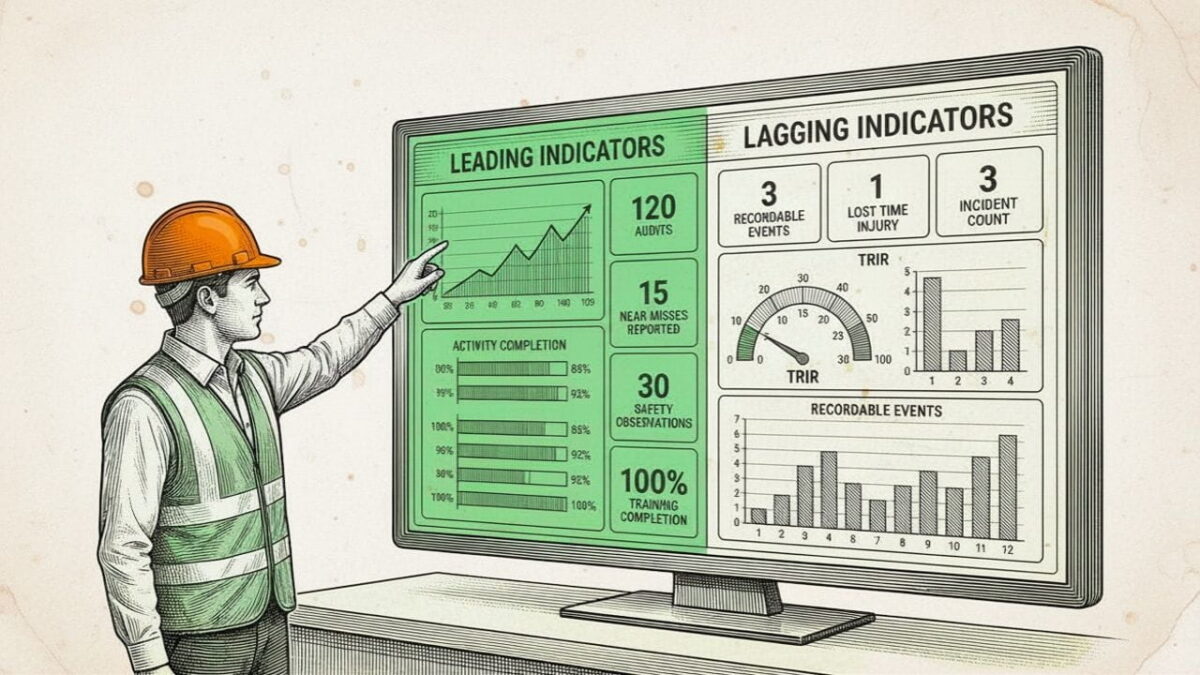
As we discussed in our Safety Metrics: Leading AND Lagging Indicators (And Why You Need Both) blog post, tracking both leading and lagging safety indicators reduces incidents by 77% only if you have a system that connects them.

Download the Free Dashboard

What You'll Get in this Safety Metrics Dashboard

✓ 10 Comprehensive Tabs – Executive Summary, Data Entry, Lagging Indicators, Leading Indicators, Cost Analysis, Corrective Actions, Audit & Compliance, Benchmarks, Predictive Analytics, plus Instructions with all assumptions documented

✓ 33 Comprehensive Safety Metrics – Tracking both outcomes (lagging) and prevention activities (leading)

✓ 28 Auto-Calculating Formulas – Zero manual math. Enter your data once, everything updates automatically

✓ 15+ Visual Charts – Track trends over time, compare against BLS benchmarks, visualize leading-to-lagging correlations, and identify high-risk periods with color-coded indicators

How to Use This Safety Metrics Dashboard

Step 1: Enter Monthly Data

Go to Data Entry tab. Input your 33 metrics: incidents, near-misses, training hours, audit findings, PPE compliance, corrective actions, etc. All formulas recalculate automatically.

Step 2: Review Executive Summary

See your main KPIs at a glance: TRIR, DART, LTIFR, Days Since Last Recordable, Total Cost of Injuries. Traffic lights show you’re green (excellent), yellow (good), or red (needs action) vs industry benchmarks.

Step 3: Analyze Trends

Visit Predictive Analytics tab. Check your near-miss to incident ratio. Review Risk Score trend (lower is better). Look for patterns: Do near-misses spike before injuries? Does high overtime correlate with incidents?

Step 4: Take Proactive Action

When Risk Score increases or leading indicators flash warning signs, intervene immediately: deploy refresher training, close overdue corrective actions, investigate PPE compliance drops, reduce overtime. Then track whether your lagging indicators improve next month.

FAQs

Why is this Safety Metrics Dashboard free?

No catch. We’re eTraining, a safety training company, and we built this dashboard to demonstrate our commitment to data-driven safety programs. If you find it valuable and later need OSHA training courses (like OSHA 10/30, HAZWOPER, or Competent Person training), we’d appreciate your business, but there’s zero obligation.

No advanced skills required. All formulas are pre-built and locked to prevent accidental changes. Just enter your monthly data, and everything is calculated automatically. The Instructions tab includes step-by-step guidance.
Initial setup takes 30 minutes to customize industry benchmarks and enter historical data (optional). Ongoing maintenance is just 15 minutes per month to enter your current data. The dashboard handles all calculations instantly.
Absolutely. The Benchmarks tab includes Construction (2.3), Manufacturing (2.8), Warehousing (4.8), and Healthcare (3.5) standards from BLS 2023, but you can adjust these to match your specific industry or company goals. You can also add/remove metrics in the Data Entry tab if needed.

Start with the “Big 3” lagging indicators (TRIR, DART, Lost-Time Injuries) and 3-5 leading indicators that predict YOUR injury types. If you have falls, track fall protection training and observations. If you have strains, track manual handling training and mechanical aid usage. The dashboard tracks 33 metrics, but you can leave unused columns blank.

Want to See What “Engaging Training” Looks Like?

Training effectiveness is one of the most powerful leading indicators. Find out how eTraining stacks up against other providers and why 80% of our business clients stay with us for 5 years or more after trying us out.  Experience the difference of training built to engage workers, simplify compliance, and actually improve safety outcomes.

Real Results from Real Teams

Get Started with eTraining

We’re here to make compliance simpler, not more costly. Whether you’re training ten people or a thousand, eTraining gives you the tools to manage safety training with confidence.

No Minimums. No Contracts. Set it up in minutes and start assigning courses right away.
Categories
Tools

Which HAZWOPER Course Do You Need?

Which HAZWOPER Course Do You Need?

Get Your Answer in Under 2 Minutes with the HAZWOPER Course Selector.

HAZWOPER course selector

OSHA’s HAZWOPER standard (29 CFR 1910.120) has different training requirements for cleanup workers, emergency responders, and TSD facility employees. Choosing the wrong course can mean wasted time and money. Our free course selector asks 3-4 simple questions about your work role and provides an accurate recommendation based on actual OSHA regulations.

Check out this blog that talks about  on when HAZWOPER applies, when RCRA training is the requirement, and how to tell the difference.

Does Your Facility Need HAZWOPER Training? →

HAZWOPER Course Selector

Which HAZWOPER Course Do You Need?

Step 1 of 3: Are you new to HAZWOPER or need a refresher?

FAQs

How do I know if I need HAZWOPER training?

You need HAZWOPER if you:

  1. Work at uncontrolled hazardous waste cleanup sites (Superfund, brownfields)
  2. Respond to emergency hazardous substance releases, or
  3. Work at a Treatment, Storage, or Disposal (TSD) facility.

Use our course selector above to determine your specific requirement.

40-Hour HAZWOPER is for general cleanup site workers regularly exposed to hazardous substances at or above Permissible Exposure Limits.

24-Hour HAZWOPER is for occasional cleanup site workers with limited exposure, TSD facility employees, or emergency response technicians.

The tool above will tell you which you need.

Yes! OSHA allows online training for the classroom instruction portion of HAZWOPER. eTraining’s online courses are fully compliant with 29 CFR 1910.120 requirements.

Cleanup site workers will still need to complete hands-on field experience separately.

Yes, if you’re a cleanup site worker. OSHA requires 3 days of supervised field experience after 40-hour training, or 1 day after 24-hour training for occasional workers.

Emergency responders and TSD facility workers do NOT need field experience, only the classroom hours.

OSHA states that if you miss your refresher deadline, your employer must determine whether you need to repeat the full initial training based on your familiarity with current procedures.

It’s best to complete your refresher within the 12-month window. We recommend setting a calendar reminder.

Why Use This Tool?

Accurate Requirements

Based on 29 CFR 1910.120, we've mapped job roles to the exact OSHA training requirement, including field experience for cleanup workers and annual refreshers.

Save Time & Money

Don't waste money on the wrong course or more training than you need. Get a personalized recommendation in 2 minutes based on your role and operations.

Trusted by Safety Professionals

With 14+ Years of OSHA Training Excellence, 87% Course Completion Rate, and 100% OSHA-Compliant Curriculum

Real Results from Real Teams

Get Started with eTraining

We’re here to make compliance simpler, not more costly. Whether you’re training ten people or a thousand, eTraining gives you the tools to manage safety training with confidence.

No Minimums. No Contracts. Set it up in minutes and start assigning courses right away.

Categories
Tools

Why Safety Programs Fail When Temperatures Drop

The Winter Safety Paradox

Why Standard Programs Fail When Temperatures Drop
Winter Safety Program

You’ve got a solid safety program. Annual training is checked off. Protocols are documented. Your completion rates look decent on paper.
Then winter hits, and everything quietly breaks. Injuries spike, protocols get skipped, and the training you invested in doesn’t seem to stick when it matters most. Winter adds hazards and breaks the systems you already have in place.

Let’s talk about why that happens and what actually works to fix it.

The Three Ways Winter Dismantles Your Safety Program

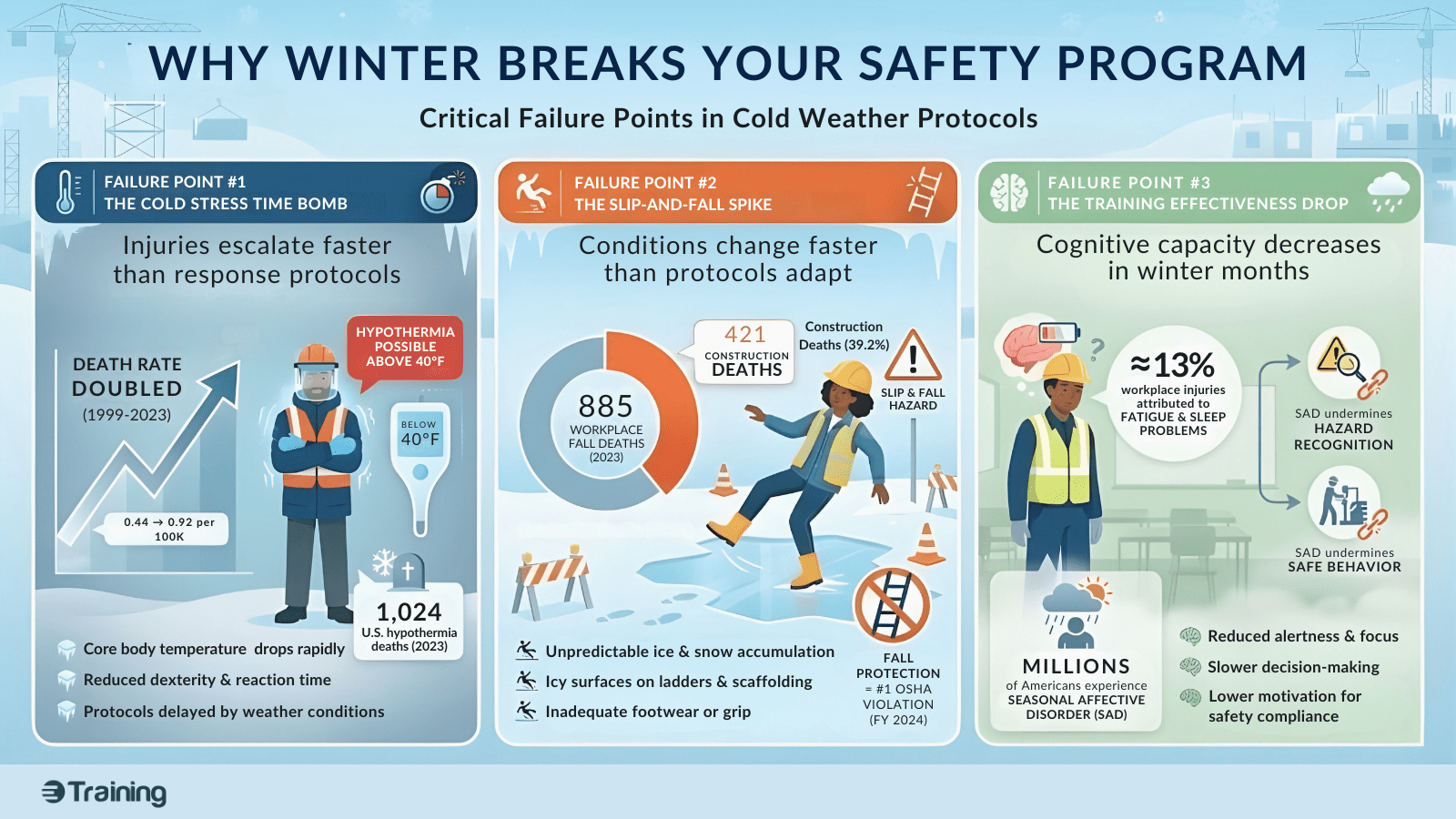
Failure Point #1: The Cold Stress Time Bomb

Cold stress injuries escalate faster than most response protocols can handle. In 2023, 1,024 people in the U.S. died from hypothermia or extreme cold, and the death rate has more than doubled since 1999, rising from 0.44 to 0.92 per 100,000 people. Between 1999 and 2022, over 40,000 Americans lost their lives to cold exposure, with the sharpest increases occurring after 2017.

Hypothermia can occur at temperatures above 40°F if workers become chilled from rain, sweat, or cold water exposure. OSHA’s guidance shows that frostbite risk increases exponentially with wind chill, yet most programs treat cold stress like heat stress with the temperature scale flipped. 

The physiology is different. When your body shifts blood flow from extremities to protect core temperature, frostbite can set in within minutes under the right conditions. By the time visible symptoms appear (gray/white skin patches, numbness), tissue damage has already started. CDC/NIOSH emphasizes that cold stress can affect any worker exposed to cold environments, and even well-trained military personnel aren’t immune. The U.S. Armed Forces diagnosed 456 service members with cold injuries in the 2023-2024 winter season alone.

Most cold stress training covers the symptoms. What it doesn’t cover: how fast things go sideways once a worker is wet, tired, or working alone in windy conditions. The gap between “I’m cold” and “I need medical attention” can be 15 minutes, not the 45 minutes your incident response protocol was built around.

The disconnect: Your standard “watch for warning signs” approach assumes you’ve got time to respond. Training says “take breaks in warm areas.” Reality: your crew is on a remote jobsite with a diesel truck cab that takes 20 minutes to heat up, or in a warehouse where the “warm area” is 55°F. The protocol doesn’t match the environment, so it gets ignored.

Failure Point #2: The Slip-and-Fall Spike

Winter slip-and-fall incidents are frequent, expensive, and predictable. The numbers from the Bureau of Labor Statistics (BLS) tell the story:

That space between the heated building and the parking lot. The loading dock after a morning freeze-thaw cycle. The sidewalk where yesterday’s snowmelt refroze overnight into black ice. These are mundane, constantly shifting conditions that standard fall protection training programs don’t address because they change by the hour. And employers are paying for it. Fall Protection remained the most cited OSHA violation in 2024 for the fourteenth straight year across all industries.

The training gap: Most slip-and-fall training shows workers how to identify hazards. But winter hazards don’t exist until suddenly they do. A walkway that was safe at 7 a.m. is a skating rink by 8:30 a.m. after the sun hit that patch of compacted snow. Workers get trained once in October, then face changing conditions daily for four months.

Standard programs treat surface management as a facilities issue and personal awareness as a training issue. They’re both operational issues that require constant adaptation, and most safety programs aren’t built for that level of ongoing response.

Failure Point #3: The Training Effectiveness Drop

Your training completion rates drop, comprehension suffers, and retention falls off in winter. Not because your training got worse. Because your workers’ capacity to engage with it decreased.

According to the National Safety Council (NSC), ≈ 13% of workplace injuries can be attributed to fatigue and sleep problems, which often increase during winter due to shorter daylight hours and seasonal disruptions in sleep.

Millions of Americans experience Seasonal Affective Disorder (SAD), with significantly higher rates in northern climates like Alaska and New England. SAD symptoms include low energy, difficulty concentrating, and changes in sleep and appetite, all of which impact a worker’s ability to absorb and retain safety training. And yet most safety training programs schedule the same 45-minute PowerPoint sessions in January that they ran in July, expecting the same results. Add shorter daylight (which reduces in-person training opportunities), cold-induced fatigue, and the cognitive load of the holiday season, and you’re asking workers to absorb critical safety information under the worst possible conditions.

The reality: If you’re seeing 30% training completion rates industry-wide, what do you think that number drops to when workers are:

  • Rushing through training in a cold trailer to get back to work
  • Battling seasonal depression that makes focus nearly impossible
  • Dealing with frozen equipment, delayed schedules, and compressed timelines that make “optional” training feel like a burden

The training that doesn’t land in October definitely won’t land in January. But most programs keep delivering it the same way, then wonder why incident rates climb.

"Business as Usual + Coats" Doesn't Work

Most safety programs treat winter as an add-on. A supplemental module on cold stress. A reminder email about icy walkways. An extra section in the toolbox talk.

Your training delivery needs to adapt for seasonal attention spans and cognitive load. Your incident response times need to account for how fast cold stress escalates. Your surface management can’t be a “salt the walkways” checkbox, it needs to be a dynamic, hourly assessment process during freeze-thaw cycles.

Winter is an operational risk period that requires different protocols, adapted training delivery methods, and response procedures built for the actual timeline of winter injuries. The safety programs that work in winter are the ones that asked: “How do we need to operate differently when temperatures drop, daylight shrinks, and our workforce is dealing with seasonal cognitive challenges?”

Most programs never ask these questions. They add content but don’t change the system. And every winter, the same predictable failures repeat.

The Fix: Adaptive Systems, Not More Content

Here’s what actually closes the winter safety gap:

For cold stress: Monitoring protocols that account for wind chill and wet conditions, work/rest cycles that adjust based on actual conditions (not just temperature), and response procedures built for how fast things escalate. Plus training that’s accessible when workers need it (mobile-first, short modules they can complete during weather delays instead of requiring everyone in a freezing conference room).

For slip-and-fall prevention: Surface treatment schedules that respond to changing conditions throughout the day, footwear standards that match actual winter environments, and housekeeping protocols specifically for transition zones where ice forms unpredictably.

For training effectiveness: Timing adjustments that account for daylight and cognitive load, session length modifications for seasonal attention spans, and engagement tactics specifically designed for workers dealing with winter conditions. Interactive, scenario-based training that workers can complete in 10-15 minute segments on mobile devices, not 60-minute sessions that assume focus and comfort.

Failing programs treat winter as additional content to deliver. Adaptive programs treat winter as a different operating environment that requires different systems.

What This Means for Your Winter Safety Program

If your winter safety approach looks like your summer approach with a cold stress module attached, you’ve got gaps. The question is whether you’ll close them before the next freeze or after the next preventable injury.

Ready to close those gaps? Our Winter Workplace Safety Readiness Audit walks you through the exact system checkpoints that adaptive programs use. It’ll take you 10 minutes to identify where your winter protocols are solid and where they’re quietly failing.

Download The Winter Workplace Safety Readiness Audit

About eTraining

We build interactive safety training that’s designed for how people actually learn. Our courses are mobile-accessible, scenario-based, and structured for the real conditions your workers face, including winter. Average completion rate of our courses is 87%, compared to the industry standard of 30%. Because training only works if people actually finish it and remember what they learned.

Real Results from Real Teams

Get Started with eTraining

We’re here to make compliance simpler, not more costly. Whether you’re training ten people or a thousand, eTraining gives you the tools to manage safety training with confidence.

No Minimums. No Contracts. Set it up in minutes and start assigning courses right away.

Categories
Tools

The OSHA Audit Reality Check​

The OSHA Audit Reality Check

What OSHA Compliance Officers Request

OSHA Audit Readiness Guide

This post outlines what OSHA compliance officers actually request during an audit and how you can be prepared.

The OSHA inspector walks in at 9:47 AM on a Tuesday. Your training manager is on vacation. Records are scattered everywhere. You’ve got four hours to prove your workers are trained and your record keeping is current.

Here’s the part nobody wants to admit: OSHA’s 2025 maximum recordkeeping fine is $16,589 per violation. With instance-by-instance citations now being applied to recordkeeping, those numbers stack up fast. Most companies discover their gaps when the inspector’s already standing there with a clipboard.

Let’s talk about what inspectors actually ask for and what gets you cited.

What Happens When OSHA Shows Up?

OSHA’s Field Operations Manual tells compliance officers to review “OSHA 300 logs, 300A summaries, and 301 incident reports” during the opening conference. This isn’t optional. It happens every single time.

On every OSHA inspection, they’re going to ask for your hazard communication program and up to three years of OSHA 300 recordkeeping information. Sometimes five years.

Beyond that, they’ll request training documentation, safety programs, and whatever else is relevant to why they’re there. The clock starts immediately.

When OSHA asks for records under Part 1904, you’ve got four business hours to hand them over.

Not four days. Not "let me call our IT guy." Four hours from the moment they ask.

Download the OSHA Audit Readiness Kit

The Forms You Need to Produce Right Now

OSHA Form 300 (Log of Work-Related Injuries and Illnesses)

This is your running list of every recordable injury and illness. Form 300 entries must be completed within seven calendar days of learning about a recordable case (29 CFR 1904.29). Seven actual days, not business days.

Where companies screw this up? Cases that should be on there but aren’t. Delayed entries because someone forgot to tell the safety manager. When the required records are kept but there’s no entry for a specific injury that meets the recording criteria, a citation for failure to record the case will normally be issued.

OSHA Form 300A (Annual Summary of Work-Related Injuries and Illnesses)

Year-end totals. The Form 300A Annual Summary must be posted from February 1 through April 30 (29 CFR 1904.32) where workers can see.

Where companies screw this up? Forgetting to post it entirely. Or taking it down in March because you needed the bulletin board space. Remember Posting Requirements violations can result in penalties up to $16,550.

OSHA Form 301 (Injury and Illness Incident Report)

The full story behind every case on your 300 Log. Form 301 must be completed within seven calendar days for each recordable case (29 CFR 1904.29).

Where companies screw this up? Improperly completed forms. No coordination between what’s in workers’ comp records and what’s on the OSHA forms.

How Long Should You Keep Them?

You must save the OSHA 300 Log, the privacy case list if you have one, the annual summary, and the OSHA 301 forms for five years following the end of the calendar year they cover.

That injury from 2020? You need those records through December 31, 2025. Not from the date of the injury. From the end of that calendar year.

Training Records: Yes, They Ask For Them

Training records are not part of the 29 CFR 1904 injury and illness logs, but OSHA routinely requests them during inspections under the FOM (2025).
They request training certification and documentation for PPE, fall hazards, general safety and health, plus “any and all documentation of training” for relevant employees.

What Are They Checking?

  • Did you train the people who are required to be trained?
  • Can you prove it?
  • Does the training actually meet the requirements of the OSHA standard?

Where Companies Fail?

  • Records scattered across multiple vendor portals and spreadsheets
  • Certificates with no details about what was actually covered
  • That classic response: “I know José took the course, I just can’t find the certificate right now”
  • Login credentials for old vendor platforms that don’t work anymore

The Electronic Submission Requirement (Don't Miss This)

Here’s something a lot of companies don’t know about: Covered employers must submit their OSHA injury and illness records electronically using OSHA’s Injury Tracking Application by March 2 each year.

Who has to submit?

Everyone submits Form 300A if:

Your establishment had 250 or more employees in the prior calendar year, OR
Your establishment had 20-249 employees and you’re in certain high-risk industries listed in Appendix A to Subpart E

You also submit Forms 300 AND 301 if:

Your establishment has 100 or more employees and is in an industry listed in Appendix B to Subpart E

The deadline: March 2 of the year following the covered year (for example, March 2, 2026 for calendar year 2025 data)

What happens if you don't submit?

If a company is inspected by OSHA and failed to submit these forms when required, it may result in an Other-Than-Serious citation.

Keep your 2025 records current because you’ll need to submit them by March 2, 2026.

Use OSHA’s ITA Coverage Application to determine if you’re required to electronically submit your data.

The Instance-By-Instance Problem

When OSHA issues incident-by-incident penalties it can get very expensive very fast.

Incident-by-incident citations were first employed in recordkeeping cases, and it’s very easy to make a mistake on your records log and end up paying egregious violation fines for it.

The Real Audit Readiness Test:

Stop right now. Don’t open any files or log into anything. Just answer these questions:

  1. Can you name where your OSHA 300 Log is for this year and the past three years?
  2. Do you know if your Form 300A was actually posted from February through April 2025?
  3. Can you tell me right now if you have complete Form 301s for every single entry on those 300 Logs?
  4. Did you submit your 2024 data electronically by March 2, 2025 if you were required to?
  5. If I asked for training records for five random workers, where would you look first? And how long would it take you?
  6. Can you do all of this within four business hours if an OSHA inspector walks in?

If you hesitated on any of those, or if your answer involved calling someone who’s not available, you’re not ready.

OSHA CITATION REALITY CHECK

Maximum $16,550  per violation  X

instance-by-instance citations
Missing Form 300A
$16,550
5 incomplete Form 301
$82,750
8 unapproved training records
$132,400

One messy audit total

$231,700

Instance-by-instance citations mean every missing or incomplete record = separate penalty. What looks like “just some record keeping gaps” becomes a six-figure problem fast.

How eTraining's Dashboard Keeps Your Training Records Audit-Ready

Evaluating Safety Training Vendors? Start with This Free Buyer’s Toolkit

Make vendor selection simple with a 3-phase framework used by EHS and safety leaders to shortlist, score, and choose the right training provider — in days, not months.

Real Results from Real Teams

Get Started with eTraining

We’re here to make compliance simpler, not more costly. Whether you’re training ten people or a thousand, eTraining gives you the tools to manage safety training with confidence.

No Minimums. No Contracts. Set it up in minutes and start assigning courses right away.